

Application hosting: Nextcloud, Vaultwarden, Uptime Kuma
Picture a ten-person agency: it wants Nextcloud for the team's files, a password vault for shared passwords and a monitoring tool to see whether client sites are up. All of them are open source and all can be installed with Docker in a few commands. The real work starts after installation: certificates, updates, backups, logs. Application hosting is a way to hand over the server side of that work and keep only the application for yourself. In this post we explain the difference between running Docker on your own VDS and managed application hosting, what the five applications in the catalogue do, and what you can do in the panel.
Docker on your own VDS or a managed application?
When you install Docker on your own cloud server, everything is yours: which application, which version, which settings. So is the maintenance. Operating system updates, the firewall, a reverse proxy for HTTPS certificates, image updates, backing up application data and moving that backup elsewhere, what happens when the disk fills up: each is a separate task. The container itself is not a backup either. Deleting and recreating a container is easy, but if there is no copy of the data inside it, the data does not come back.
With application hosting, each application runs as its own project on Docker. The server, Docker, HTTPS and the backup target are ready on our side. You work inside the application: you share folders in Nextcloud, you build workflows in n8n. You get less flexibility and, in return, less maintenance.
| Topic | Own VDS + Docker | Application hosting |
|---|---|---|
| Which application | Anything you want | Applications in the catalogue |
| Server maintenance | You | Us |
| HTTPS certificate | You set it up | Let's Encrypt, automatic |
| Application updates | By hand, pulling images | "Güncelle" (update) in the panel, backup first |
| Backup | You build and move it | "Şimdi yedekle" (back up now), one file to S3 storage |
| Access | Root and SSH | Panel tools and the application's own screens |
The rule of thumb is simple. If you want to gather several applications on one machine with your own settings, run software outside the catalogue or get a shell on the server, a cloud server fits better. If you want to keep one or two applications running without worrying about maintenance, application hosting fits better.
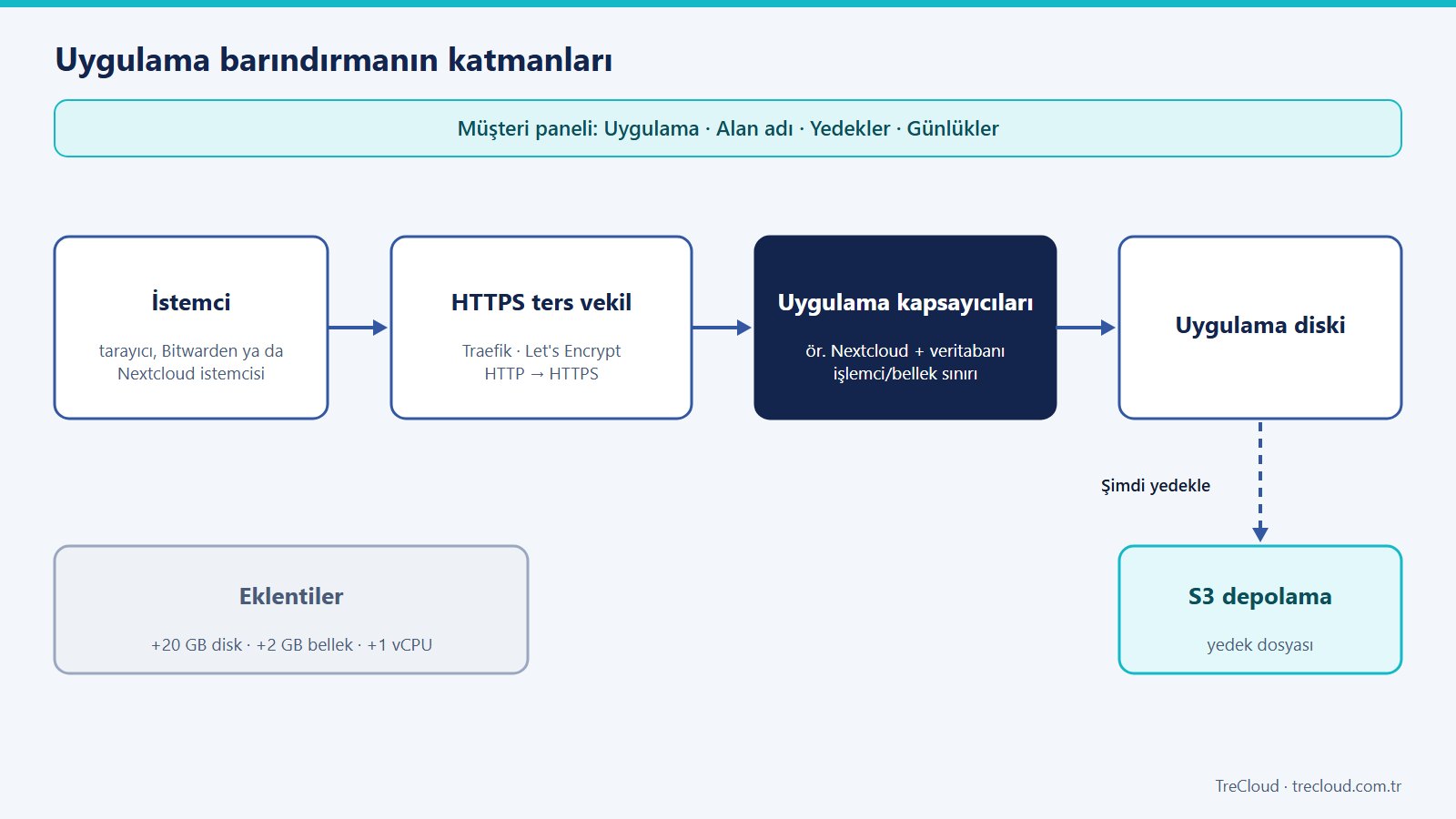
The layout is roughly this: in front, a reverse proxy that receives HTTPS requests; behind it, the application's containers (e.g. the application and its database) and the application's own disk. Backups go to S3 storage.
What do the catalogue applications do?
Plans are split by application: n8n Small, Medium and Large; Nextcloud Medium; Vaultwarden; Uptime Kuma. The CPU, memory and disk values of each plan are on the plan card. If they are not enough, you can add extra disk (20 GB), extra memory (2 GB) and extra CPU (1 vCPU) add-ons, and you can take more than one of each.
Nextcloud
Nextcloud is file sharing and sync software that runs on your own server. With the desktop client you sync a folder on your computer, with the phone app you upload photos, and you share files by link. Once the Calendar and Contacts apps are added, your phone's calendar and address book can also sync over CalDAV/CardDAV. An accounting firm can hand client documents over with a time-limited, password-protected share link instead of email attachments. Nextcloud comes with an administrator account ready; you see the login details in the panel. Disk is limited to the value on the plan card; if your archive will grow, plan for the extra disk add-on from the start.
Vaultwarden
Vaultwarden is an open source project that independently reimplements the server side of the Bitwarden password manager. It is not an official Bitwarden product and has no connection to the Bitwarden company. On the other hand, Bitwarden's official browser extension, desktop and mobile apps work with it when you enter your Vaultwarden address as the server address. You can gather team passwords under an organization and share them with people.
Start knowing two things. First, the vault is end-to-end encrypted: if you forget your master password, neither we nor anyone else can open the vault. Second, after creating your own accounts, turn off new sign-ups on Vaultwarden's admin page; otherwise anyone who finds your address can create an account. New client versions sometimes require an up-to-date server too; when "Güncelle" (update) appears in the panel, do not put it off.
Uptime Kuma
Uptime Kuma is a monitoring tool that checks at regular intervals whether your sites and servers are up. You define HTTP(S) address, keyword-on-page, TCP port, ping and DNS checks. When a check fails you get a notification through channels such as email, Telegram or Slack, and you can also prepare a status page to show your clients. It is a good start for an agency that wants to watch the 20 sites it maintains from one screen.
An honest note: the monitoring tool also runs on a server. If the sites you monitor are on the same infrastructure, the monitor may go quiet during a shared outage. For a critical service, keeping a second check from a different place is a good habit.
What about WordPress?
If you want to build a WordPress site, the right place is the web hosting plans: cPanel, email accounts and multiple sites sit in one place. The application hosting catalogue has no WordPress plan.
n8n
n8n is a workflow automation tool that connects applications to each other: writing a record to a sheet when a form is filled in, emailing a report every morning and so on. It comes in three sizes, Small, Medium and Large; as your workflows grow in number and weight, you move to a larger size. For details see what is n8n, and for first steps the first n8n workflow article.
What is in the panel?
On the service page, under Hizmetlerim (My services), you see Hizmet Bilgileri (service details: status and password) and four quick actions: Uygulama (Application), Alan adı (Domain), Yedekler (Backups) and Günlükler (Logs). The tabs are Overview, Add-ons, Billing and Activity; extra disk, memory and CPU are ordered from the Add-ons tab.
Application
Here you find the application's address and the "Uygulamayı aç" (open application) button, the status of the application and its components, and start, stop and restart buttons. Login details come with "Göster" (show) and "Kopyala" (copy). CPU, memory and disk charts for the last 48 hours show whether the application fits its plan; if the memory line sits at the ceiling all the time, it is time for extra memory. When a new version is out, "Güncelle" (update) appears. To reinstall the application from scratch there is "Sıfırdan kur" (reinstall); because it is hard to undo, it asks for a confirmation word, and we recommend taking a backup first.
Setup protection
In n8n and Uptime Kuma, the first visitor becomes the administrator. If someone gets there before you once the address goes live, they become the owner of the application. Setup protection closes that gap: until setup is finished, the site asks for a separate username and password before the application's own login. After creating your own administrator account you remove the protection from the panel, and you can turn it back on if you want. Details are in the first steps with application hosting article.
Domain
You can connect up to 3 of your own domains (e.g. bulut.firmaniz.com.tr). The required A and CNAME records are written on the page; if the domain does not yet point to the server, it is not added. After the DNS record propagates, a Let's Encrypt certificate is obtained on the first visit and HTTP requests are redirected to HTTPS. The steps are in the connecting a domain to an application article.
Backups and updates
"Şimdi yedekle" (back up now) puts all of the application's data (files and database) into S3 storage as a single file. For a consistent copy the application is stopped briefly, so take backups at a quiet hour rather than at peak time. From the list you can restore or delete a backup. Before an update a backup is taken; if the new version does not start, the application returns to the previous version and the backup. We explained what S3 storage is in what is S3 object storage; restore details are in the application backups and updates article.
Logs
You pick a component and see its last 200 lines. When "the application does not open", this is the first place to look; adding the relevant lines when opening a support ticket speeds up the fix. Passwords and secret values are masked with *** in the logs; still, glance over the lines once before sharing them.
Limits: what we do not promise
Application hosting is not a server that does everything. You cannot install an application outside the catalogue; each plan is for its own application. Shell access to the server is not on the product card; you work with the application through the panel tools and the application's own admin screen. Resources are as on the plan card and grow with add-ons.
Let us be clear about backups too. The panel backup is taken when you click "Şimdi yedekle" (back up now); automatic scheduled backups are not listed on the product card. Backups sit in the same provider's S3 storage. In the spirit of 3-2-1, we recommend also exporting important data to your own side with each application's export tools: n8n workflows as JSON and the Vaultwarden vault with the Bitwarden client's encrypted export. In Nextcloud, files are already synced to your computer by the desktop client.
Following updates is your job as well. When a new version is out, "Güncelle" (update) appears in the panel; especially for internet-facing applications such as Vaultwarden, do not leave it waiting for long. Our target for overall service availability is 99.9%; details are in the service agreement.
In short
Docker on your own VDS brings the freedom to choose everything together with the maintenance of everything. Application hosting runs Nextcloud, Vaultwarden, Uptime Kuma and n8n ready to use; what is left for you is the application itself plus the Application, Domain, Backups and Logs tools in the panel. Remove setup protection once setup is done, turn off sign-ups in Vaultwarden, take a backup before important changes and export critical data to your own side as well. Current plans are on the application hosting plans page.
Frequently asked questions
Is Vaultwarden the official Bitwarden?
No. Vaultwarden is an open source project that independently implements Bitwarden's server interface and has no connection to the Bitwarden company. Official Bitwarden clients work with it when you enter your Vaultwarden address as the server address.
Can I connect my own domain to the application?
Yes, you can connect up to 3 domains. The required A and CNAME records are shown in the panel; the certificate is obtained automatically on the first visit.
What should I do if resources are not enough?
From the Add-ons tab you can order extra disk (20 GB), extra memory (2 GB) or extra CPU (1 vCPU); you can take more than one of each.
Can I run an application that is not in the catalogue?
Applications outside the catalogue are not on the product card. A cloud server fits better for containers of your own choice; if you have a special need, ask through a support ticket.
What happens if an update fails?
A backup is taken before the update. If the new version does not start, the application returns to the previous version and the backup.
Comments0
No Comments Yet
Be the first to share your thoughts.
Please sign in or sign up to leave a comment.