

SSL certificate types: DV, OV or EV?
An accounting firm launching its new website gets two quotes: one says free Let's Encrypt, the other recommends a "corporate" certificate. Both show the same padlock in the browser, so where is the difference? SSL certificate types differ along two axes: how thoroughly the issuer verifies you (DV, OV, EV) and how many domain names the certificate covers. In this article we explain both in plain language, along with the shorter certificate lifetimes of 2026 and which type suits which site.
Validation levels: DV, OV, EV
Before issuing a certificate, the certificate authority (CA) checks something. What it checks determines the certificate type. Encryption is not part of that decision; the only thing that changes is the identity information written into the certificate.
DV: domain validation
DV (Domain Validation) asks a single question: do you control this domain? Proof is given in one of three ways. You place a file at a specific path on the site (HTTP validation), add a TXT record to the domain (DNS validation) or approve a link sent to the domain's administrative email address. When automated, it takes minutes. The certificate contains only the domain name, not the company name.
OV: organization validation
OV (Organization Validation) checks, in addition to domain control, that the organization actually exists. The CA looks at official records such as the trade registry and often asks for confirmation by phone. Once approved, the company name and city are written into the certificate's subject field. Because the process depends on documents and confirmation, it can take days.
EV: extended validation
EV (Extended Validation) is a stricter version of OV. The organization's legal, physical and operational existence and the authority of the person applying are checked one by one. The rules are set out in the CA/Browser Forum EV Guidelines. EV certificates cannot be issued as wildcards.
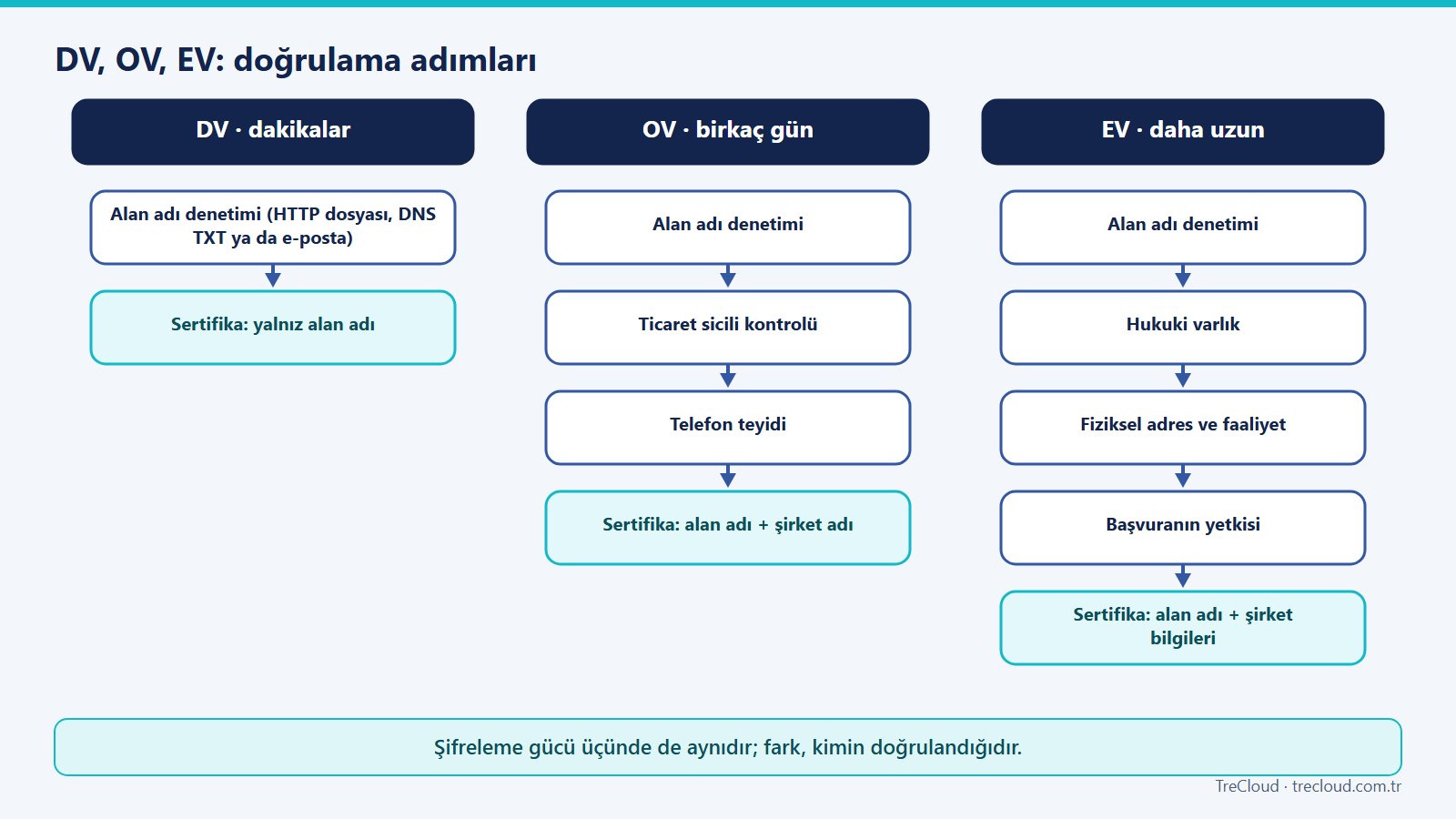
| Type | What is checked | Typical time | What the certificate shows |
|---|---|---|---|
| DV | Domain control | Minutes | Domain name only |
| OV | Domain + the organization's official record | A few days | Domain + company name |
| EV | Domain + legal, physical and operational existence + applicant's authority | Depends on documents, longer | Domain + company details |
Types by coverage: single domain, wildcard, multi-domain
The second axis is which names the certificate protects. The names a certificate covers are listed in its SAN (Subject Alternative Name) field, and the browser looks only at that list. If someone visits the site with a name that is not on the list, the browser shows a warning no matter how expensive the certificate was.
- Single domain:
alanadi.comand, with most products,www.alanadi.com. Enough for a corporate site or a single shop. - Wildcard: written as
*.alanadi.com; it covers every subdomain at that level, such asshop.alanadi.comandapi.alanadi.com, but not two levels down, such asa.b.alanadi.com. A wildcard from Let's Encrypt requires DNS validation. - Multi-domain (SAN): puts different domain names, for example
alanadi.com,alanadi.com.trandmarkaniz.net, into one certificate. Adding a name to the list requires reissuing the certificate.
Validation level and coverage are independent of each other: a DV certificate can be a wildcard, and an OV certificate can be multi-domain. The only exception is the EV wildcard ban mentioned above.
Encryption strength does not depend on the type
The most common misconception we hear is "EV encrypts more strongly." Three things determine how strongly a connection is encrypted: the key type and size (for example RSA 2048 or ECDSA P-256), the TLS versions the server allows (TLS 1.2 and 1.3) and the selected cipher suites. All of these are server configuration. On the same server, a free DV certificate and an expensive EV certificate use the same encryption.
There is no visible difference in the browser either. Since 2019, Chrome no longer shows a separate green company name in the address bar for EV sites, and other mainstream browsers have taken the same path. Unless a visitor clicks the padlock and opens the certificate details, they see no difference between DV and EV. Buying EV as a "trust badge" is therefore an outdated habit. We covered what the padlock does not guarantee in our article on the green padlock and data leaks.
The 2026 certificate lifetime schedule
The CA/Browser Forum, which writes the shared rules for browsers and CAs, is gradually shortening the maximum validity of TLS certificates through ballot SC-081. The schedule is in the CA/Browser Forum Baseline Requirements:
| Issued | Maximum validity |
|---|---|
| From March 15, 2026 | 200 days |
| From March 15, 2027 | 100 days |
| From March 15, 2029 | 47 days |
So even a paid certificate you buy today is valid for at most 200 days. Even if you pay for a one-year or longer term, the certificate has to be reissued and reinstalled during that term. Clarify at order time how this step works for your paid certificate. Let's Encrypt certificates are already valid for 90 days, well below today's limit.
Why automatic renewal is now a must
Once certificate lifetime drops to 47 days, manual renewal means remembering the same task seven or eight times a year. Missing one means the site opens with a red browser warning. The answer is the ACME protocol: a client on the server (such as AutoSSL in cPanel or certbot) renews and installs the certificate by itself before it expires. Let's Encrypt has worked this way from the start, and some paid CAs also issue certificates via ACME.
Setting up automation is not enough; you need to see that it works. If you use certbot on a VDS, you can test renewal without touching the real certificate:
sudo certbot renew --dry-runTo see from the terminal who issued any site's certificate and when it expires:
openssl s_client -connect alanadi.com:443 -servername alanadi.com </dev/null | openssl x509 -noout -dates -issuer -subjectThe notAfter line in the output is the expiry date. issuer shows the CA that issued the certificate, and subject shows whom it was issued to. On a DV certificate the subject line shows only CN=alanadi.com; OV and EV certificates also include the company name (O=). To list the names the certificate covers:
openssl s_client -connect alanadi.com:443 -servername alanadi.com </dev/null 2>/dev/null | openssl x509 -noout -ext subjectAltNameWe covered why renewal breaks silently (a DNS change, a redirect rule, a full disk and so on) in detail in our article on Let's Encrypt renewal problems. Protocol details are in the Let's Encrypt documentation.
Let's Encrypt vs. paid DV
Technically both do the same job: they validate your domain, encrypt the connection with the same strength and show a padlock in every mainstream browser. The differences are at the edges and should not be overstated.
- Term: a Let's Encrypt certificate is valid for 90 days and renewal must be automatic. With paid DV the purchased term is longer, but a single certificate is still bound by the 200-day limit.
- Warranty: paid certificates come with a warranty from the CA. Its conditions are narrow; it covers cases such as the CA issuing a certificate in error, not your site being compromised.
- Support: Let's Encrypt offers support through its community forum. With a paid product there is a contact on the reseller and CA side you can turn to.
- Site seal: some paid products provide a seal image you can place on your pages. Its effect on visitors is debatable; do not make it your only reason to buy.
- Corporate requirements: some supplier forms or legacy systems may require a certificate from a specific CA. If such a requirement exists, a paid certificate makes things easier.
Which certificate for which site?
For a personal blog, a corporate brochure site or a shop taking 300 orders a day, a DV certificate is enough; in terms of encryption it is the same as OV and EV. For a software service with many subdomains, a wildcard DV or an automatic separate certificate per subdomain does the job.
OV makes sense when a customer's supplier contract or your company's internal policy requires an "organization-validated certificate." EV is for organizations whose own audit rules require it; there the reason is policy and audit, not how the browser displays the site. Without such a requirement, spending time and budget on extra validation has no visible return.
Whichever you choose, make sure all of the site's content loads over HTTPS. A single http:// image is enough to trigger a browser warning; details are in our article on mixed content warnings.
SSL options at TreCloud
Let's Encrypt is free on TreCloud web hosting plans, and the certificate inside hosting renews automatically. Most sites do not need a separate certificate; we explained the setup step by step in our article on installing Let's Encrypt on hosting.
For those who want a paid certificate, the SSL certificate page lists RapidSSL (DigiCert), Thawte SSL123 (DigiCert) and PositiveSSL (Sectigo). All three are DV certificates, cover a single domain (www included) and come with free installation. TreCert Let's Encrypt is also on the list. Current prices are shown on the product page.
To be clear: OV and EV certificates are not currently on our product list. The paid products listed are single-domain. If you need an OV, EV, wildcard or multi-domain certificate, ask through a support ticket, and we will work out together what we can provide and how the process would run.
Quick summary
DV, OV and EV only show how thoroughly the issuer verified you; encryption strength is the same for all three, and browsers no longer display EV differently. Coverage is a separate decision: single domain, wildcard or multi-domain. In 2026 certificate lifetime dropped to 200 days and will reach 47 days by 2029, so whichever type you choose, automate renewal and check the expiry date from time to time. For most sites the Let's Encrypt certificate included with hosting is enough.
Frequently asked questions
Is a DV certificate enough for an e-commerce site?
In terms of encryption, yes; DV, OV and EV use the same strength. If no contract or policy requires organization validation, DV is enough.
Will an EV certificate show my company name in the address bar?
No. Chrome has not shown it since 2019, and other mainstream browsers behave similarly. The company name is visible only in the certificate details.
Why is my certificate not valid for longer than 200 days?
Under CA/Browser Forum ballot SC-081, the maximum validity is 200 days from March 15, 2026. It drops to 100 days on March 15, 2027 and to 47 days on March 15, 2029.
Do I have to renew a Let's Encrypt certificate manually every 90 days?
No, renewal should be automatic. On TreCloud hosting the certificate renews automatically; on your own server you install an ACME client such as certbot.
Comments0
No Comments Yet
Be the first to share your thoughts.
Please sign in or sign up to leave a comment.