

What are DDoS and WAF, and how do they differ?
The website of a shop taking 300 orders a day goes down on a campaign evening. The team first says "we got hit by a DDoS", then looks at the access log and sees that the traffic reaching the server is actually small, but the same search page is being called hundreds of times per second. These are two different attacks and they are stopped at different layers. In this article we explain what DDoS is, what a WAF is, how they differ and what to do during an attack.
What DDoS is: volume and application layer
DDoS (Distributed Denial of Service) is an attempt to make a service unreachable with requests from many sources. The goal is not to steal data but to stop the site or server from responding. Attacks fall roughly into two groups.
Volumetric attacks (L3/L4)
These happen at the network and transport layers. UDP floods, SYN floods and reflection (amplification) attacks belong here. In reflection, the attacker spoofs the victim's address and sends small queries to open DNS or NTP servers; those servers send much larger responses to the victim. The aim is to fill the link or the connection tables. By the time this traffic reaches your web server it is too late; you cannot stop this volume from inside the server.
Application layer attacks (L7)
These happen at the HTTP and HTTPS level. The requests look normal: constant attempts on the login page, an expensive search query called again and again, clients that keep connections open slowly. Total traffic can be small; but because every request runs the database or a PHP process, server resources run out. The shop in the opening example belongs to this group.
Network filtering and WAF work at different layers
DDoS filtering and a WAF (Web Application Firewall) are often confused. A network filter looks at packets: source, destination, protocol, rate. It does not read what is inside the request. A WAF opens the HTTP request and compares the path, parameters, headers and body against rules. One protects the link, the other the application.
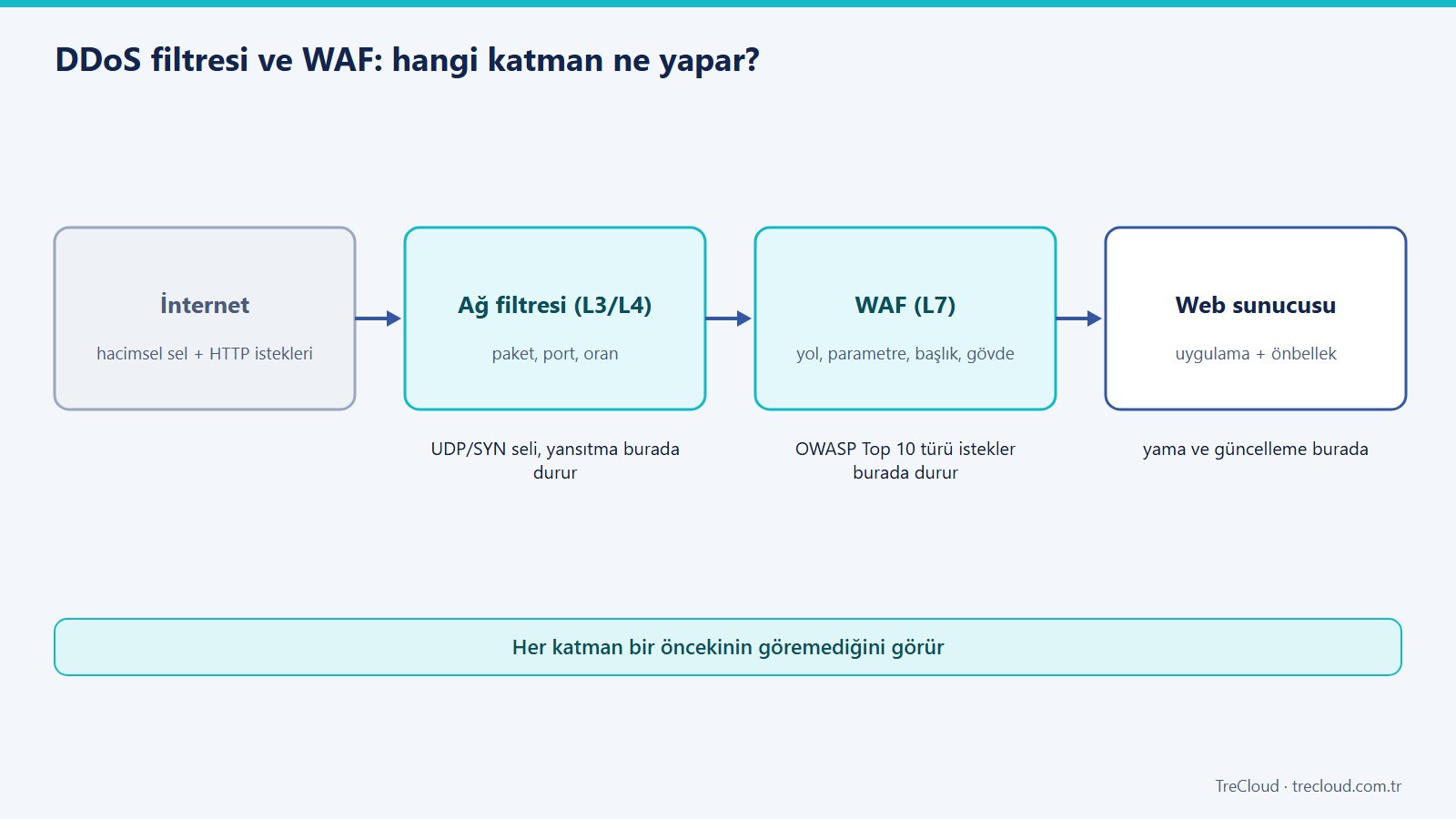
| Network filter (L3/L4) | WAF (L7) | |
|---|---|---|
| Looks at | Packet, port, protocol, rate | HTTP request: path, parameter, header, body |
| Stops | Volumetric floods, reflection | Requests carrying attack patterns, abuse |
| Cannot see | The intent of a normal-looking HTTP request | Volume that fills the link |
That is why "we have DDoS protection" does not cover the need for a WAF, and "we have a WAF" does not cover the need for network filtering. "Unlimited traffic" is neither; a traffic quota is a billing matter, not protection.
What a WAF catches and what it does not
A WAF is good at known attack patterns. Requests of the types in the OWASP Top 10 list are examples: parameters carrying SQL injection attempts, form fields trying to inject scripts, directory traversal (../) attempts, scanning requests to known admin paths. A WAF is also used to close certain paths to certain sources or to limit request rates.
What a WAF does not catch should be just as clear. First, a WAF is not a substitute for patching. A rule that blocks a flaw in an old plugin can be bypassed by an attacker changing the request slightly; the lasting fix is to update or remove the plugin. Second, it cannot see business-logic errors: a coupon that can be used twice is a technically valid request. Third, it cannot tell apart a login with a stolen password; the remedy for that is two-step verification. Fourth, it cannot stop volumetric DDoS, because that traffic fills the link before it reaches the WAF.
Managing false positives
Every WAF sooner or later blocks a legitimate request. A long SQL sample pasted into an accounting firm's client form, or HTML code in a content management panel, can look like an attack pattern. The easiest response is to turn the rule off entirely, but that is also the riskiest; we covered this separately in the article thinking the form works because the WAF rule is off.
The right method is a narrow exception: only for that path and that parameter, only that rule. Note the time, address and error code of the blocked request; the rule number is found with this information. In an emergency a temporary opening can be made, but a temporary opening and a permanent rule change are separate jobs, and both should be recorded. Unrecorded exceptions pile up, and a year later no one knows why they were opened.
Rate limiting
One of the most effective tools against L7 attacks is rate limiting: limiting how many requests a client can send to a given path per unit of time. Login, password reset, search and cart endpoints are the first candidates. If you run nginx on your own server (Ubuntu 24.04), here is a simple example for the login page:
# /etc/nginx/conf.d/oran.conf  (read inside the http block)
limit_req_zone $binary_remote_addr zone=giris:10m rate=10r/m;
limit_req_status 429;

# in the site configuration, keeping your existing PHP settings:
location = /wp-login.php {
    limit_req zone=giris burst=5 nodelay;
    # ... your existing fastcgi_pass / include lines ...
}
After the change, test the configuration and reload:
sudo nginx -t && sudo systemctl reload nginxSet the limit by measuring. First check the access log for how many requests that path gets on a normal day; set the limit comfortably above that. If many users sit behind one IP, such as an office network, loosen the limit accordingly.
The role of caching and CDN
A page served from cache does not touch the database. That is why a well-configured page cache sharply lowers the cost of an L7 attack to the server. If the attacker adds random parameters to the address to bypass the cache, a cache rule that ignores unknown parameters weakens that trick.
A CDN serves static files and cacheable pages in front of the server, from distributed points. It both spreads the volume and reduces the number of requests reaching the server. But there is a condition: the server's real IP address must not be known, or the server must accept connections only from the CDN. If an old DNS record or an e-mail header sent directly from the server reveals the real address, the attacker bypasses the CDN and goes straight to the server.
What to do during an attack
Panic is the most expensive mistake during an attack. The sequence below is a flow that even a small team can follow.
- Identify the type. If the server responds but slowly and the connection count is normal, the problem is most likely at L7. If the server cannot be reached at all, there may be a link-level issue; check the system status page first.
- Check the log. List the addresses and paths sending the most requests:
awk '{print $1}' /var/log/nginx/access.log | sort | uniq -c | sort -rn | head. See the connection summary withss -s. - Take a narrow measure. Put a rate limit on the targeted path; if needed, close that path temporarily or open it only to known addresses. Shutting down the whole site does the attacker's job.
- Open a support ticket. In the support ticket, select the related service and write the start time, the affected IP and domain, and a log sample you saw. Do not write passwords in the ticket.
- Write up the aftermath. When the attack is over, record in a short note what happened, what worked and which permanent rule was added.
Which layer is where at TreCloud
TreCloud product pages state the protection layers separately; let us read them without exaggeration. The cloud server page says "DDoS Protection: always-on network filtering blocks common attacks". This is a filter that runs continuously at the network layer; you do not need to switch it on. On an unmanaged server, the application layer, i.e. web server settings, rate limits and software updates, is your responsibility.
The web hosting plan cards include the line "Voxility - Imunify360 Protection". Imunify360 is security software running on the hosting server; we explained what it does and does not do in the article Imunify360 is not a miracle. Old PHP and an unpatched content management system remain a risk even with this protection.
If you need a separate application-layer filter, the WAF product filters web requests with rules written at order time. The scope (domains, paths) is settled at order time, it works with HTTPS and rule changes are recorded. A WAF is not a substitute for an SSL certificate; the site still needs a certificate to be HTTPS. If a legitimate request is blocked, the rule change is made through a defined request; an emergency opening and a permanent rule are different, and both are recorded.
For those who want help running a WAF, OpenClaw is a WAF operations assistant. It produces recommendations but does not apply rules itself and does not sit in the data path. In other words, your requests do not pass through OpenClaw; the final decision is still yours or the authorized team's.
Frequently asked questions
What is the difference between DDoS protection and a WAF?
A DDoS filter screens volume and packet rate at the network layer. A WAF looks at the content of the HTTP request and blocks requests carrying attack patterns.
If I have a WAF, do I still need to update plugins?
Yes. A WAF makes known patterns harder but is not a substitute for patching. The update is what closes the flaw.
What should I do if the WAF blocks a legitimate form?
Note the time and address of the blocked request and open a support ticket. The rule is fixed with a narrow exception for that path and parameter only, and the change is recorded.
Do I need to turn anything on for DDoS protection on a cloud server?
No. According to the product page, network filtering is always on. Application-layer settings on an unmanaged server are yours.
Comments0
No Comments Yet
Be the first to share your thoughts.
Please sign in or sign up to leave a comment.