

Hosting or VDS? Decide in 8 questions
A first website usually starts on hosting. The first serious campaign, the first custom software or the first "let's install this service on the server too" request is what raises the VDS question. Get the hosting or VDS decision wrong and either the budget is wasted or your nights go to patching servers. In this article we explain the difference between the two, who is comfortable with which, and the 8 questions that settle the decision.
Hosting vs. cloud server
On shared web hosting, the server, operating system, web server, PHP and security layer belong to the provider. You manage files, databases, email and DNS through cPanel. On TreCloud web hosting this layer consists of cPanel, CloudLinux LVE resource isolation, Enterprise NVMe SSD, Imunify360 and free Let's Encrypt SSL. You do not patch the server; in return, you cannot install whatever software you like on it.
A VDS (cloud server) is a virtual machine with vCPU, RAM and disk reserved for you. TreCloud Star VDS plans come with 2-12 vCPU Intel Xeon Platinum 8160, 2-32 GB ECC RAM, 20-300 GB Enterprise NVMe disk, a 1 Gbps port and 1 IPv4 address; Linux or Windows can be installed and you get full root access (SSH). Everything from the operating system up is yours: installation, updates, firewall, backups.
| Topic | Web hosting | VDS |
|---|---|---|
| Management | cPanel, managed by the provider | Root/SSH, managed by you |
| Resources | LVE ceiling (2 cores, 2-6 GB RAM) | Reserved vCPU and RAM |
| Software | PHP and MySQL sites | Any software, Docker, Windows |
| Updates | Server side handled by the provider | Operating system is on you |
| IP | Shared server IP | 1 IPv4 of your own |
The difference is not only technical; it is about time. On hosting, PHP updates, server security patches and malware scanning happen on the provider's side; the time you spend each month is limited to content and plugin updates. On a VDS the same jobs go into your calendar. When comparing monthly bills, count these maintenance hours too: the cost of someone spending two hours a week on the server can exceed the difference between plans. On the other hand, VDS resources are not shared with anyone; you know in advance how much CPU and memory you can use at peak hours.
Who hosting suits
For a law firm's brochure site, a café's menu page or a WordPress blog with a few hundred visitors a day, hosting is enough. These sites need PHP, a database, SSL and a few mailboxes. If nobody on the team knows Linux, hosting is the right place: server security is the provider's job, and you look after your content.
When choosing hosting, look beyond the disk line: inodes, I/O, CPU and RAM ceilings, PHP version and backups. We go through these one by one in what to look for in web hosting. If you are an agency managing fifteen clients' sites, you often do not need a VDS either; with reseller hosting you give each client a separate cPanel account.
Who a VDS suits
A VDS makes sense when you need something hosting cannot do. An API written in Node.js or Python, a queue worker that runs all the time, several services under Docker, your own mail server, or an accounting application that only runs on Windows all belong here. A shop taking 300 orders a day that runs search, checkout and stock sync at the same time on campaign days may also consider a VDS if it keeps hitting its LVE ceiling.
For a software team, the real gain of a VDS is control: you decide which PHP or database version is installed, which ports are open and where logs are kept. In the TreCloud customer panel a VDS has CPU, Memory, Disk and Traffic gauges, usage graphs for the last 24 hours and 7 days, and quick actions such as Start, Stop, Restart and Console. When resources run short you can resize from the panel; extra IPs, disk, memory and CPU are available as add-ons.
Who is responsible on an unmanaged VDS
On an unmanaged VDS, the provider is responsible for the infrastructure: physical server, virtualization (VMware at TreCloud), network and power. You are responsible for everything inside the virtual machine. Operating system updates, firewall, SSH settings, application errors and backups are your job. At TreCloud, infrastructure support continues 24/7 on unmanaged servers too; patching, monitoring and backups are a managed service that can be added as a separate line item. For a longer discussion, see what unmanaged really means.
On a new VDS running Ubuntu 24.04, take at least these steps on day one: update the system, open only the ports you need, and log in with an SSH key instead of a password.
sudo apt update && sudo apt -y upgrade
sudo ufw allow OpenSSH
sudo ufw allow 80,443/tcp
sudo ufw enable
sudo ufw status verbose
The "Format" action in the panel reinstalls the operating system from scratch and erases all data on the disk; move your data elsewhere before trying it. Automatic backup is available as an add-on in the panel, but if you have never tested a restore, do not assume you have a backup. We explain the firewall logic in a day-one firewall.
An 8-question decision tree
Answer the questions below in order. Stopping at the first "yes" and looking in that direction is enough in most cases; if every answer is "no", hosting is the right starting point for you.
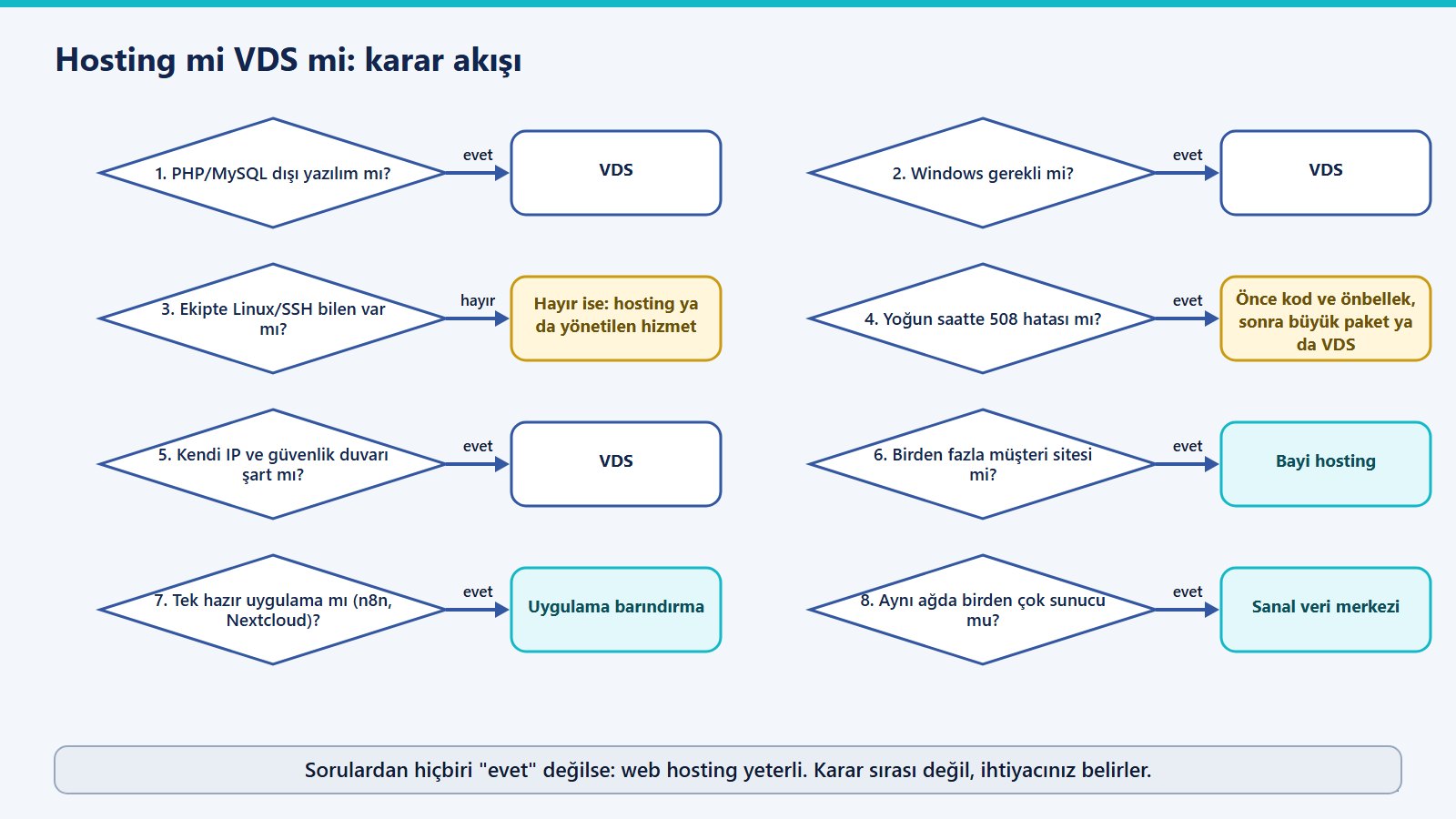
- Will you run anything other than PHP and MySQL? If there is Node.js, Python, Java, Docker or an always-on service, go VDS.
- Do you need Windows? If an application only runs on Windows, go VDS; hosting is Linux-based.
- Is there someone on the team who can handle SSH and Linux updates? If not, an unmanaged VDS is risky; choose hosting or a managed service.
- Does the site show 508 errors at peak hours? Check the code and cache first; if the ceiling is still not enough, a bigger plan or a VDS.
- Do you need your own IP address and your own firewall rules? If yes, VDS.
- Are you hosting several clients' sites? Reseller hosting is usually enough; a VDS only if you want to manage everything yourself.
- Do you only need a single ready-made application? For an app like n8n, Nextcloud or Uptime Kuma, application hosting means less work.
- Will you manage several servers on the same network from one resource pool? If yes, a virtual data center rather than separate VDS plans.
The grey area in between
The choice is not always hosting or VDS. The corporate site can stay on hosting while a heavy API or reporting service runs on a VDS; you separate them with a subdomain and a DNS record (for example www on hosting, api on the VDS). That way the site is not affected by the API's maintenance window.
If you do not want to run a whole server for a single application, application hosting is a middle path: each application runs as a separate project on Docker, and backups, domains and updates are handled from the panel. For a software team that needs three or four servers, a virtual data center lets you create as many virtual machines as you need from a vCPU, RAM and NVMe pool.
Moving from hosting to a VDS does not mean giving up your cPanel habits: the VDS add-ons include Control Panel, LiteSpeed and CloudLinux. Plan the move during business hours rather than on a Friday evening, lowering the DNS TTL a day in advance and taking a backup first. For the difference between the terms VPS and VDS, see the difference between VPS and VDS.
Quick summary
Hosting is for those who want to leave the server to the provider and focus on their site. A VDS is for teams that will install their own software, want control over resources and network, and can take on server maintenance. When deciding, first ask what you will run, then who will manage it; resource needs are the third question. If you are unsure, open a support ticket describing your site's software and traffic, and we will work out the right plan together.
Frequently asked questions
Can I use hosting and a VDS together?
Yes. The site can run on hosting and the heavy service on a VDS; you separate them with a subdomain and a DNS record.
Can I use cPanel on a VDS?
The VDS add-ons include a Control Panel option. Licensing and setup details are settled at order time or through a support ticket.
Can I get support on an unmanaged VDS?
Infrastructure support runs 24/7. Patching, monitoring and backups inside the virtual machine are a managed service, billed as a separate item.
Will my site get faster just by moving to a VDS?
Not always. If the slowness comes from a heavy theme or slow queries, the same code will be slow on a VDS too.
Comments0
No Comments Yet
Be the first to share your thoughts.
Please sign in or sign up to leave a comment.