

5651 logging explained: how TreLog keeps access logs
You offer Wi-Fi to guests in a hotel lobby, or everyone in a 40-person office goes online through the same line. In that situation Turkish Law No. 5651 may treat you as a “collective use provider” and expect access logs to be kept. 5651 logging means collecting those logs from your device and storing them in a way that shows they were not changed afterwards. Below we first explain what the law and the regulation say, based on the official text, and then what TreLog does and does not do technically.
What does Law No. 5651 regulate?
The full name of Law No. 5651 is the “Law on Regulating Broadcasts on the Internet and Combating Crimes Committed Through Such Broadcasts”. It entered into force in 2007 and has been amended many times since. The law defines the obligations of content providers, hosting providers, access providers and collective use providers separately. You can read the current text on the Law No. 5651 page at mevzuat.gov.tr.
This article is about the collective use provider. Article 2 of the law defines it as one “that provides people with the opportunity to use the internet at a certain place and for a certain period”. A café, a hotel, a hospital waiting room, a dormitory or a company that gives its staff a shared line may meet this definition. Whether your own situation falls under it is a legal assessment; here we only give the framework.
Article 7 of the law makes two distinctions. Regardless of whether they act commercially, all internet collective use providers must take the measures set by regulation on blocking access to criminal content and on keeping access logs. Those serving commercially, such as internet cafés, must also obtain a permit from the local administrative authority. The same article provides for warnings, administrative fines or suspension of commercial activity for up to three days for this group. Amounts and details are in the official text; we do not repeat them here.
What does the regulation mean by “access log”?
The details are not in the law but in the Regulation on Internet Collective Use Providers. Published in 2017, this regulation defines access logs as: IP addresses distributed in the internal network, start and end time of use, the MAC address of the devices using those addresses, the destination IP address and, on lines shared through NAT, the real IP and port assigned to the user.
As for duration, the regulation requires all internet collective use providers to record access logs electronically and keep them for two years. The same article also lists using a content filtering system and, in public areas, setting up a system that identifies users by SMS or similar methods. For commercial providers the regulation adds one more step: the value that confirms the accuracy, integrity and confidentiality of the logs must be recorded daily and also kept for two years.
That last item explains why timestamps come up. For a log file to be shown two years later as “this is how it was that day”, you need evidence that the file existed on that date and has not changed since. The law was amended again in 2026, so we recommend following the latest text of the law and the regulation from the official source and from BTK announcements.
How does TreLog work?
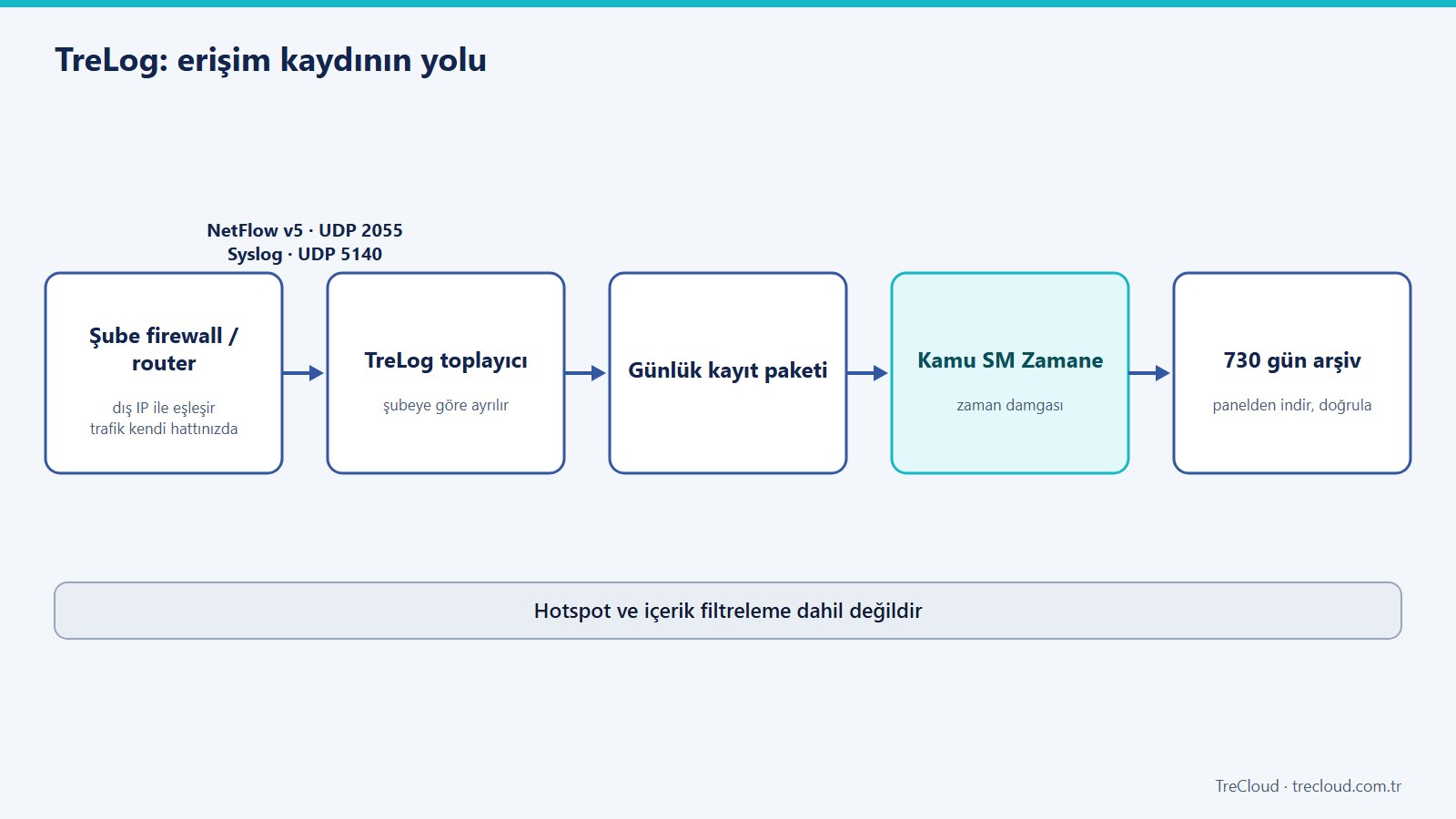
TreLog is a cloud service that collects and stores access logs for you. You do not need a separate log server in your office; a firewall or router that can send NetFlow or syslog is enough. Your internet traffic stays on your own line. What reaches the TreCloud network is not the traffic itself but the logs your device produces.
Your device sends two kinds of records. NetFlow is a flow record that summarises which internal address sent how much data to which destination, on which port and when; TreLog receives it on UDP port 2055 and expects NetFlow v5. Syslog is the device's own event log; DHCP leases, logins and firewall rule events come from here. TreLog listens for syslog on UDP port 5140.
Every incoming record is matched to the external IP address of the device you defined for a branch. If the firewall of your Kadıköy office goes out from 203.0.113.10 and that address is assigned to the Kadıköy branch in the panel, records from that address land in the Kadıköy archive. If the external IP is not on the branch, the record does not match; this is the first thing to check after setup.
Timestamping and 730-day retention
TreLog seals each day's log package with a Kamu SM Zamane timestamp. Kamu SM is the Turkish public certification centre, and Zamane is its timestamping service. The stamp lets you verify that the package existed at a given moment and has not been changed since.
Logs are kept for 730 days, that is, two years. From the panel you can download the package of any day and verify its timestamp. When an official request asks “which device was using 192.168.1.37 on 15 March at 14:00?”, you download that day's package and hand it over together with its stamp. Try this once before any request arrives; you do not want your first attempt to happen under pressure.
As the service term ends, reminder e-mails arrive 30, 14, 7, 3 and 1 days before expiry. When you renew, collection continues without interruption. If you miss the date, the archive will have empty days, so keeping automatic renewal on makes sense.
Branches, log sources and daily quota
A TreLog account works with branches. Each branch has its own name and the external IP address of the device sending logs, and logs are archived separately per branch. A log source is the number of firewall or router external IP addresses that can send logs; a branch with two internet lines uses two log sources.
| Package | Log sources | Branches | Daily archive |
|---|---|---|---|
| TreLog Cloud Starter | 1 | 1 | 10 GB |
| TreLog Cloud Pro | 5 | 3 | 30 GB |
| TreLog Cloud Enterprise | 20 | 10 | 100 GB |
| TreLog Extra Branch | +1 | +1 | - |
The daily archive quota is a soft limit used to monitor archive growth. In a hotel with hundreds of guests, NetFlow volume grows fast. That is why enabling NetFlow sampling on the device is recommended on busy lines; the ready commands in the panel include this setting. Sampling means not every flow is written individually, so weigh this setting against your obligations. The Extra Branch package is only for existing TreLog customers. Current prices are shown on the TreLog 5651 logging packages page.
Device setup: ready commands and a MikroTik example
The panel has ready setup commands for 14 brands: FortiGate, Sophos, MikroTik, SonicWall, Palo Alto, pfSense, OPNsense, Cisco, Huawei, Check Point, WatchGuard, Juniper, Ruijie/Reyee and Berqnet. When you pick your brand and click “Copy commands”, the collector address and ports are filled in. Other devices that can send NetFlow v5 or syslog can also be used.
To see what happens in the background, here is a generic example for RouterOS 7. Replace TOPLAYICI_IP with the collector address shown on your service page. For your own setup, use the ready command in the panel; those commands also include settings such as sampling.
# NetFlow v5 flow records (UDP 2055)
/ip traffic-flow set enabled=yes interfaces=all
/ip traffic-flow target add dst-address=TOPLAYICI_IP port=2055 version=5

# Syslog (UDP 5140): DHCP and firewall events
/system logging action add name=trelog target=remote remote=TOPLAYICI_IP remote-port=5140
/system logging add topics=dhcp action=trelog
/system logging add topics=firewall action=trelog
Two details matter. First, on MikroTik a firewall rule writes events to syslog only if logging (log=yes) is enabled on that rule. Second, records from a device sending NetFlow v9 or IPFIX do not appear in TreLog; make sure the version is v5. On pfSense and OPNsense the settings are made through the web interface and a plugin, so follow the steps in the panel there as well.
What TreLog does not do
A hotspot, the captive portal where a guest signs in with a phone number, is not included in TreLog. The regulation asks for a system that identifies users in public areas; you need to set that up with a separate hotspot solution. If you use a hotspot, TreLog still collects and stores the logs.
TreLog does not do content filtering either. For the filtering measure listed in the regulation you use the filtering feature of your firewall or a separate solution. The information in the archive is also limited to what your device sends. The regulation's definition also covers MAC addresses and internal IP assignment; if your device does not send DHCP logs over syslog, that information will not be in the archive. After setup, look at a few days of logs in the panel and check that the fields you expect are arriving.
Finally, the regulation speaks of recording logs on the provider's “own systems”. Clarify with your legal adviser how a cloud archive meets this wording for your business, together with other obligations such as filtering and the permit. If your remote team connects to the company network, our corporate VPN service, which is offered with 5651 logging, may fall under the same assessment.
A short setup checklist
Getting a branch ready from start to finish usually follows this order. The steps are small but the order matters: logs sent before the external IP is entered will not match.
- Open the branch in the panel and give it a name (e.g. “Head office”).
- Enter the external IP address the firewall uses to reach the internet; if there are two lines, add both separated by a comma.
- Pick your brand and apply the ready commands to the device; leave sampling on for busy lines.
- A few hours later, check that logs arrive in the panel, and the next day check that the daily package was created.
- Download one day's package, verify its timestamp and write this step into your internal procedure.
Keeping logs and keeping backups are different jobs; to avoid mixing them up, see our article on the difference between retention and backup periods. If you also put the downloaded daily packages into your own archive, the 3-2-1 backup rule applies here too.
Frequently asked questions
Do I need a separate log server in the office for TreLog?
No. A firewall or router that can send NetFlow or syslog is enough; the logs go to the collector at TreCloud.
How long are logs kept?
730 days, that is, two years. Each day's package is stamped with Kamu SM Zamane and can be downloaded and verified from the panel.
Is a hotspot login page included in TreLog?
No. A hotspot is a separate service. If you use one, TreLog still collects and stores the logs.
What should I check if no logs arrive from my device?
Check that the external IP on the branch is the address the device really uses to reach the internet and that the NetFlow version is v5. If the problem continues, open a support ticket.
Related pages
- TreLog 5651 logging packages
- What is TreLog 5651 logging? (knowledge base)
- Corporate VPN
- Open a support ticket for setup
- Quote form for multi-branch setups
This article is for general information only and is not legal advice. Clarify your obligations with your legal adviser. Quotations from the law and the regulation were read from the text at mevzuat.gov.tr on November 24, 2026.
Comments0
No Comments Yet
Be the first to share your thoughts.
Please sign in or sign up to leave a comment.